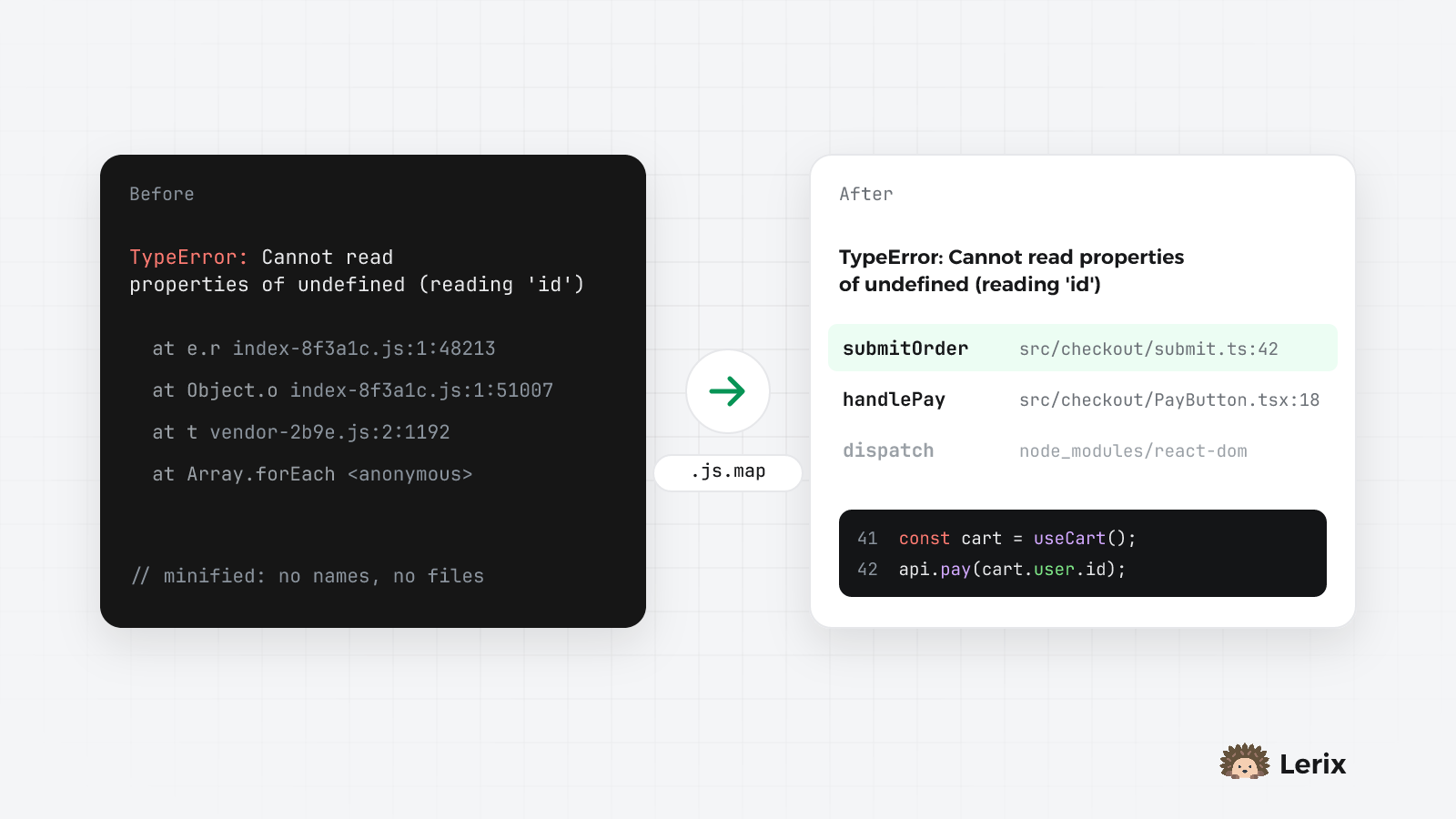
Production JavaScript is minified: variable names shrink to one letter, files are merged into content-hashed chunks, and the whole thing often sits on a single line. That's good for load times and terrible for debugging. An error from production looks like this:
TypeError: Cannot read properties of undefined (reading 'id')
    at e.r (index-8f3a1c.js:1:48213)
    at Object.o (index-8f3a1c.js:1:51007)
There is no file you recognise, no function name and no line you can open. Source maps fix that. Your bundler already knows how each character of the output maps back to your source; upload that map, and the same error arrives as submitOrder in src/checkout/submit.ts, line 42, with the surrounding code.
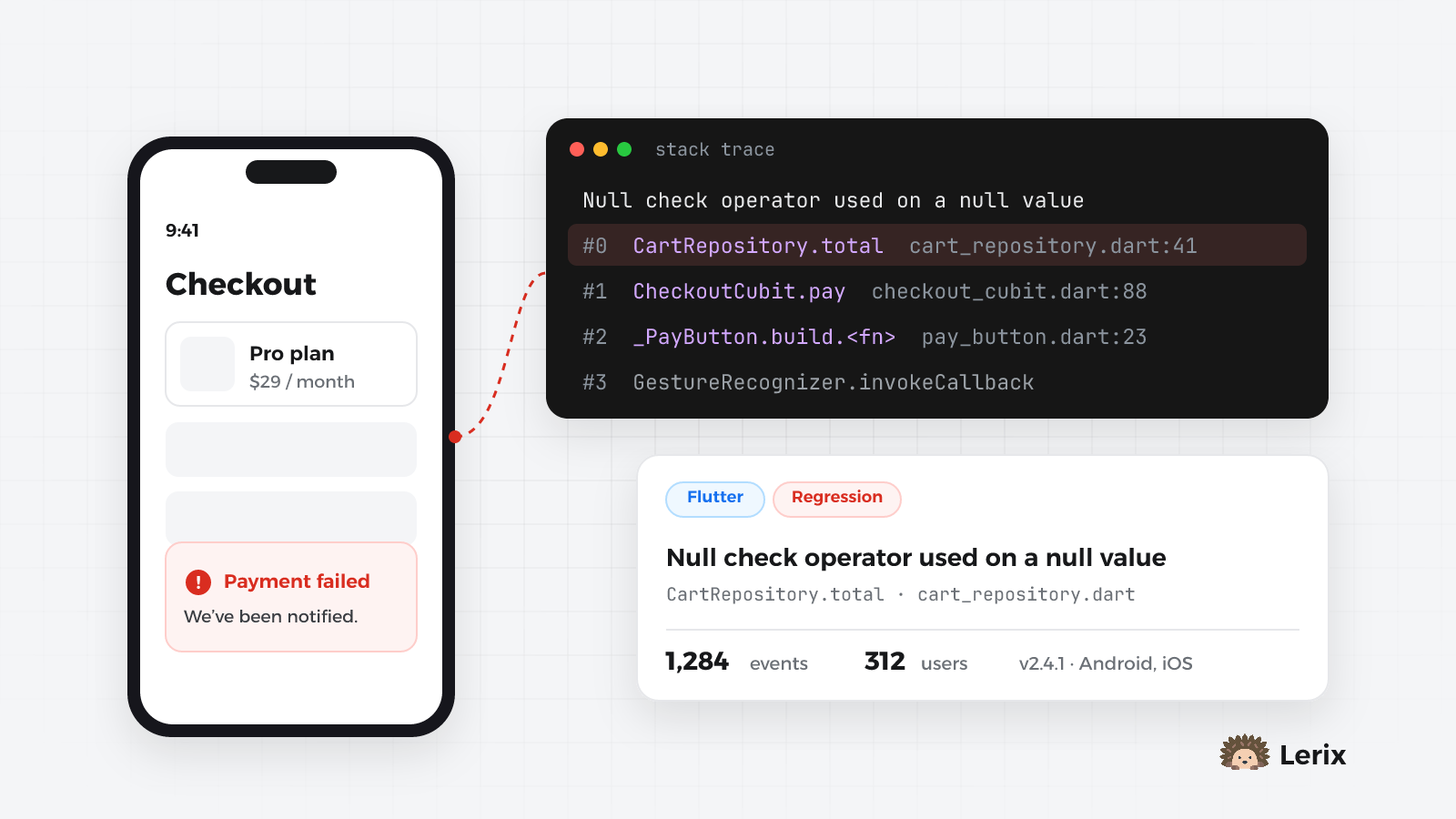
This guide sets that up for Vite, Create React App, Next.js, Angular and Flutter Web, and then explains how Lerix groups the resulting errors into issues.
1. Make the build produce source maps
Turn maps on, preferably hidden: the .map files are written, but the bundle doesn't point at them, so browsers never download them.
| Setup |
Setting |
Build folder |
| Vite (React, Vue, Svelte…) |
build: { sourcemap: 'hidden' } in vite.config.ts |
dist |
| Create React App |
on by default (unless GENERATE_SOURCEMAP=false) |
build |
| Next.js |
productionBrowserSourceMaps: true in next.config |
.next |
| Angular |
"sourceMap": { "scripts": true, "hidden": true } in angular.json |
the project's outputPath |
| Flutter Web |
flutter build web --source-maps |
build/web |
2. Upload them after every build
One command, run right after the build:
npx @lerix-dev/lerix-cli upload
The CLI finds the build folder by itself (Angular's outputPath, .next, build/web, dist, build or out), uploads every .js.map it finds (CSS maps and node_modules are skipped), and then deletes the maps from the build output, so your original source is never deployed.
It reads its settings from the environment:
| Variable |
What it is |
LERIX_API_KEY |
your project's public API key |
LERIX_PROJECT_ID |
the project slug |
LERIX_SECRET_KEY |
a private key with the Upload source maps permission, from Project settings → API keys |
LERIX_RELEASE |
the version this build ships as; defaults to version in package.json (or pubspec.yaml) |
Why a secret key? The public key ships inside every web bundle, so on its own it would let anyone overwrite your maps and rewrite your stack traces. Keep the secret key in your CI, not in the app.
Add --optional to run the upload from a postbuild script: on a developer's machine without LERIX_SECRET_KEY the upload is skipped instead of failing the build. With pnpm or Yarn 2+, which don't run postbuild, chain it: "build": "vite build && lerix upload --optional".
Maps are deleted only when every upload succeeded, so a failed run can simply be retried. Use --keep-maps if you want to keep them, and --dry-run to see what would be sent.
3. Tell the SDK the same release
Lerix matches maps by script file name first, and since build chunks are content-hashed, that alone is nearly always enough. Passing the same release to the SDK makes the match exact, and it also tags every error with the version it came from:
<LerixProvider
  options={{
    apiKey: 'your-api-key',
    projectId: 'your-project-slug',
    release: import.meta.env.VITE_LERIX_RELEASE,
  }}
>
  <App />
</LerixProvider>
In Next.js, LerixNextProvider reads NEXT_PUBLIC_LERIX_RELEASE by itself; in Angular it's the release option of provideLerix(). Use a value you don't type by hand: the version in package.json or the commit SHA.
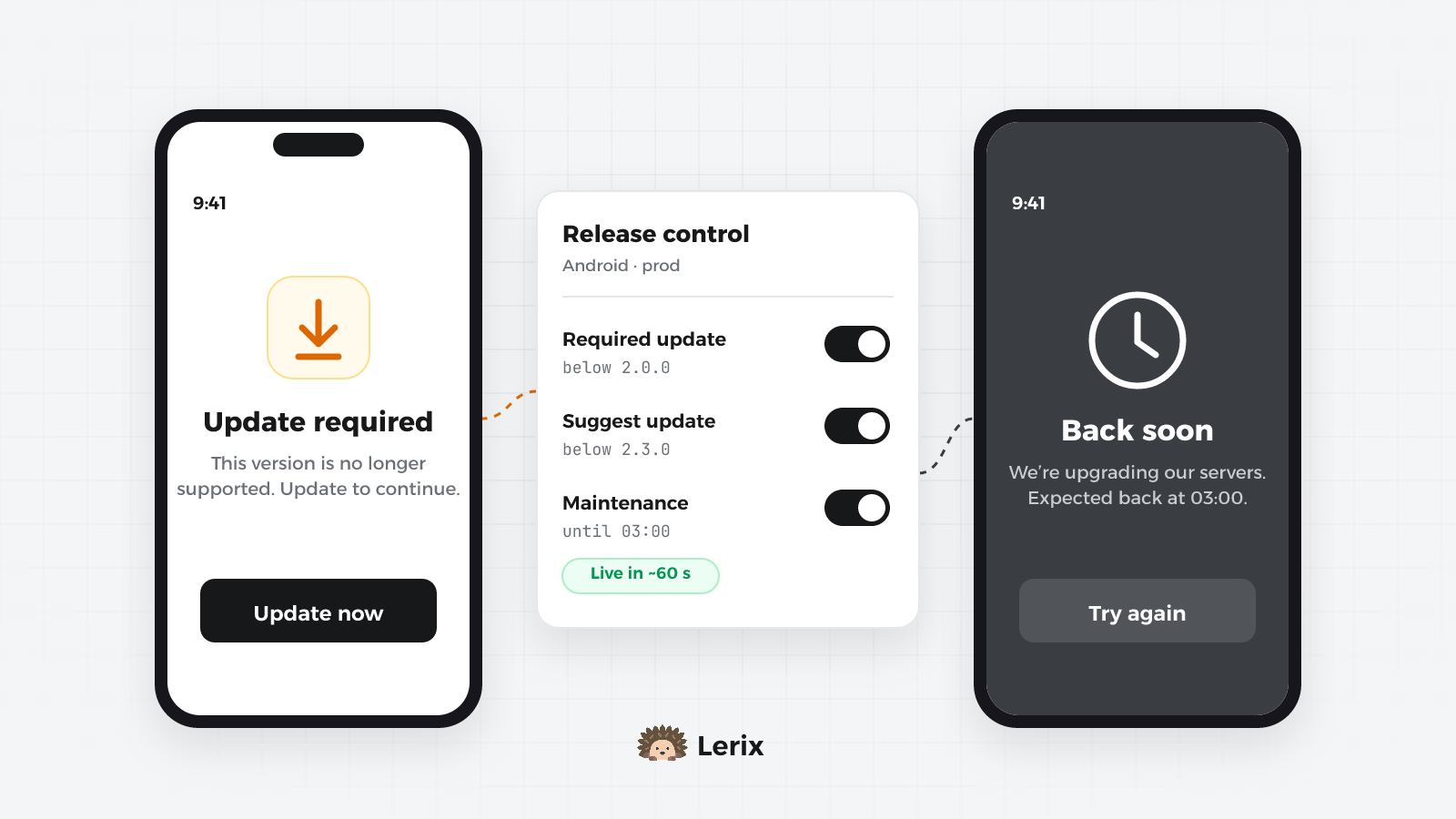
If you also use Lerix release control on the web (update prompts), use a numbered version such as 1.4.0 rather than a commit SHA: update rules compare versions as numbers.
In GitHub Actions
jobs:
deploy:
runs-on: ubuntu-latest
env:
LERIX_RELEASE: ${{ github.sha }}
steps:
- uses: actions/checkout@v4
- uses: actions/setup-node@v4
with:
node-version: 20
- run: npm ci
- run: npm run build
env:
VITE_LERIX_RELEASE: ${{ github.sha }}
- run: npx @lerix-dev/lerix-cli upload
env:
LERIX_API_KEY: ${{ secrets.LERIX_API_KEY }}
LERIX_PROJECT_ID: ${{ secrets.LERIX_PROJECT_ID }}
LERIX_SECRET_KEY: ${{ secrets.LERIX_SECRET_KEY }}
4. What changes in the dashboard
Mapping happens on the server when an error arrives. New errors show the original file, line and function, with five lines of code on each side of the failing one. Show minified still gives you the stack exactly as the browser sent it.
The readable stack is also what the AI assistant, GitHub issues and the MCP server see. Two things to know:
- Only errors that arrive after the upload are mapped; older ones keep their minified stack.
- Mapping never holds up a report. If a map is missing or slow, the error is stored as it was sent.
5. How errors become issues
Ten thousand reports of one bug should be one line in your inbox, not ten thousand. Lerix gives every error a fingerprint made of two parts:
- The first line of the message, with the parts that change masked: numbers, UUIDs, long hex ids, emails and URLs. Error codes glued to text, like
PGRST202 or #441, are kept.
- The first stack frame from your own code, reduced to function and file: no line or column, and no content hash in the file name. Frames from
node_modules, the browser and the SDK are skipped.
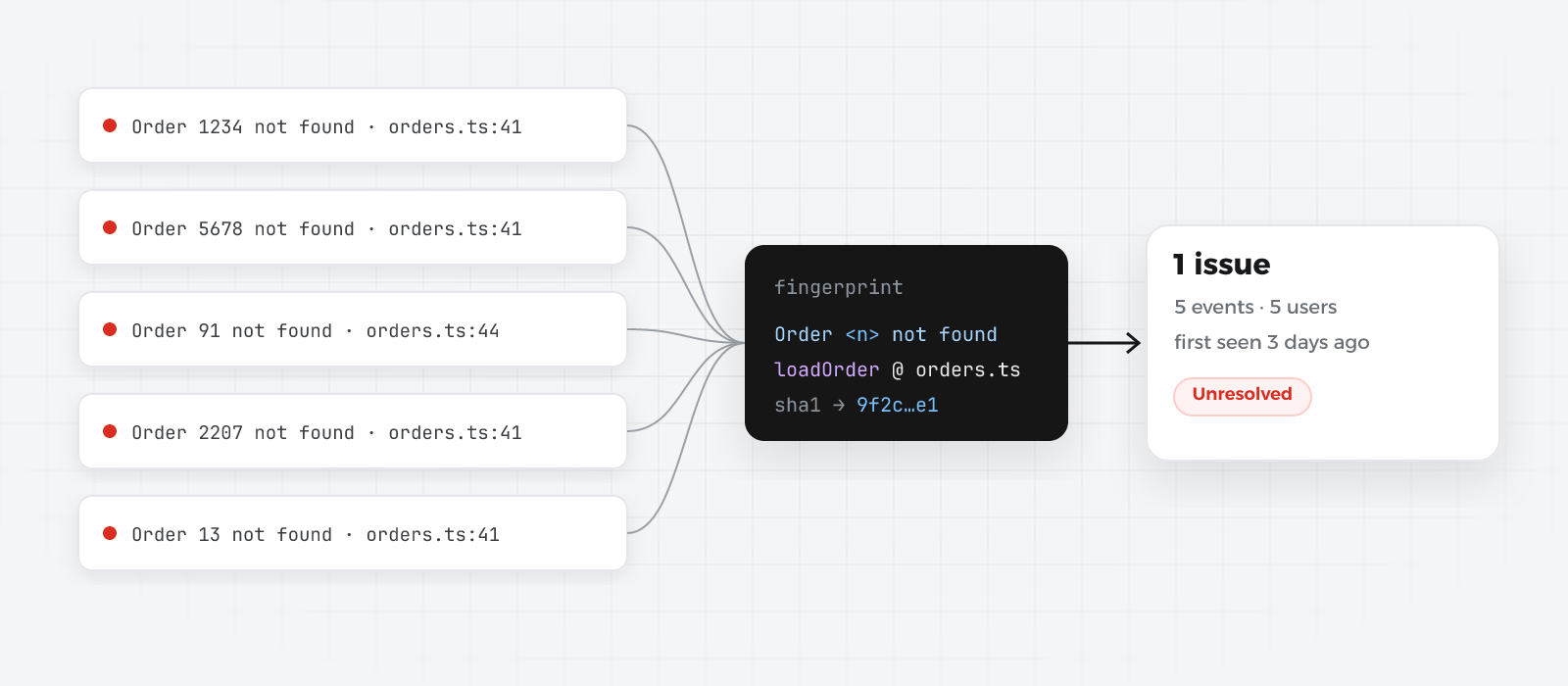
Because the line number and the chunk hash are left out, an error stays the same issue across deploys, instead of starting over with every build. And because the stack is mapped before the fingerprint is taken, grouping works on your real function names.
Each issue tracks occurrences, affected users, first seen and last seen. Status works across all occurrences:
- Resolved issues reopen by themselves when the error comes back, and you're emailed about the regression.
- Ignored issues keep counting but stay quiet, and are hidden from the default list.
6. Leave out the noise
Some browser errors carry no information at all. The server drops these for every project:
ResizeObserver loop limit exceeded and ResizeObserver loop completed with undelivered notificationsScript error., the browser's placeholder for an error in a cross-origin script, with no message or stack- errors whose stack is entirely inside browser extensions
For your own noise, filter on the device before anything is sent:
<LerixProvider
  options={{
    apiKey: 'your-api-key',
    projectId: 'your-project-slug',
    ignoreErrors: ['ResizeObserver loop', /^ChunkLoadError/],
    beforeSend: (event) =>
      event.message.includes('extension://') ? null : event,
  }}
>
Strings match anywhere in the message, ignoring case; regular expressions are tested as written. Returning null from beforeSend drops the event. Both run in the browser, before the server maps the stack, so match on the message rather than on file names.
Checklist
- Hidden source maps on in your bundler.
npx @lerix-dev/lerix-cli upload right after the build, with LERIX_SECRET_KEY in CI.- The same release in the CLI and the SDK.
- Deploy the build folder only after the upload, so the maps are gone from it.
- Throw one error in production on purpose and check that it points at your file.
Lerix keeps the newest 5,000 maps per project, up to 50 MB each.